



Burnout Is Expensive and Hard to See Coming
Call center turnover can cost over $6,000 per agent when you factor in hiring, training, and lost productivity. For crisis lines and helplines, the cost is even higher because you're losing trained advocates who understand trauma-informed care. You can't just replace that overnight.
The standard advice is to encourage staff to take breaks and practice self-care. But this advice conflicts with the reality of how shifts get assigned, how performance gets measured, and who actually ends up taking calls. The people burning out aren't always the ones logging the most hours. They're the ones absorbing the hardest calls during the hardest shifts.

See Burnout Risk Before It Becomes a Resignation
Helpline Software was built at a rape crisis center that was losing one advocate to burnout every month. The people burning out weren't the ones taking the most shift hours. In some cases, others were taking ten times as many hours without the same risk.
The difference was call time, call intensity, and the specific shifts they were covering. We built a predictive system that weights these factors to identify who's actually at risk. The day it launched, it predicted exactly one person would burn out. They did. Would knowing that a month earlier have changed the outcome?
What Our Customers Say
Our customers love how customizable the system is, the top-notch support, and how easy it is to use Helpline Software.
"…customer service is responsive, honest, articulate… it's top-notch…"

"There's definitely an awareness with the customer service team that every agency is different… It's very 'meet us where we're at.'"
"I'm loving this system. It's incredibly easy to tailor, and it does exactly what [our on-call personnel] need. Instead of troubleshooting, [our on-call personnel] are spending that time with [callers]."
"It really has changed a huge part of our organization."

"Having a system customized to fit [our needs] has been invaluable. HelplineSoftware gives us the tools we need to support both our staff and [callers]."

"Helpline Software has been an incredible thought partner. They offer creative solutions and really care about the mission of the agencies they serve."

"We are incredibly grateful for our wonderful transition to Helpline this year. The entire process has been seamless, and our team has had nothing but glowing feedback. The ease of use, combined with your excellent customer service, has made a world of difference."

"…take a leap of faith and do it… it is a game changer… it will alleviate a lot of misused time and… [you] will thank me later."

Workload Visibility That Goes Beyond Shift Hours
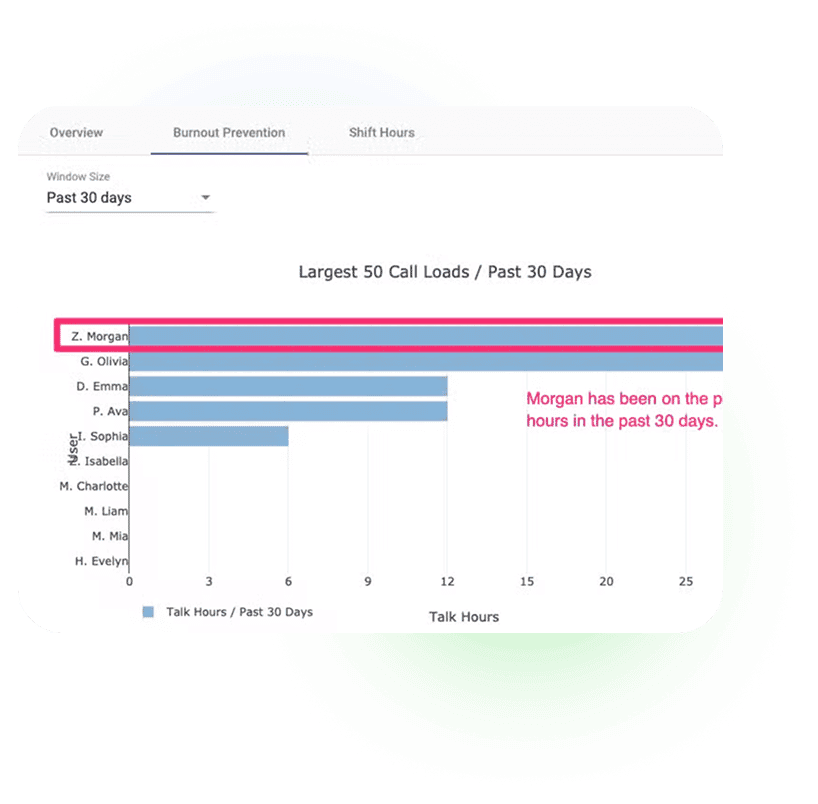
The burnout dashboard shows exactly who's taking the most calls and when. You can see at a glance that Z. Morgan has spent 30 hours on the phone in the past 30 days, even though their scheduled shift hours might look similar to everyone else's. This is the data you need to acknowledge hard work and intervene before it becomes a problem.
Most agencies track scheduled hours. That's not the same as call time. Someone scheduled for 40 hours might spend 8 hours actually on calls. Someone scheduled for 20 hours might spend 15 hours in difficult conversations. The burnout analytics show you the difference.
Protect Staff From Chronic Callers
Some callers don't need services from your agency. They call repeatedly, sometimes dozens of times a day, draining staff energy and blocking lines for people who do need help. Every agency handles this differently, and the right approach depends on your policies and mission.
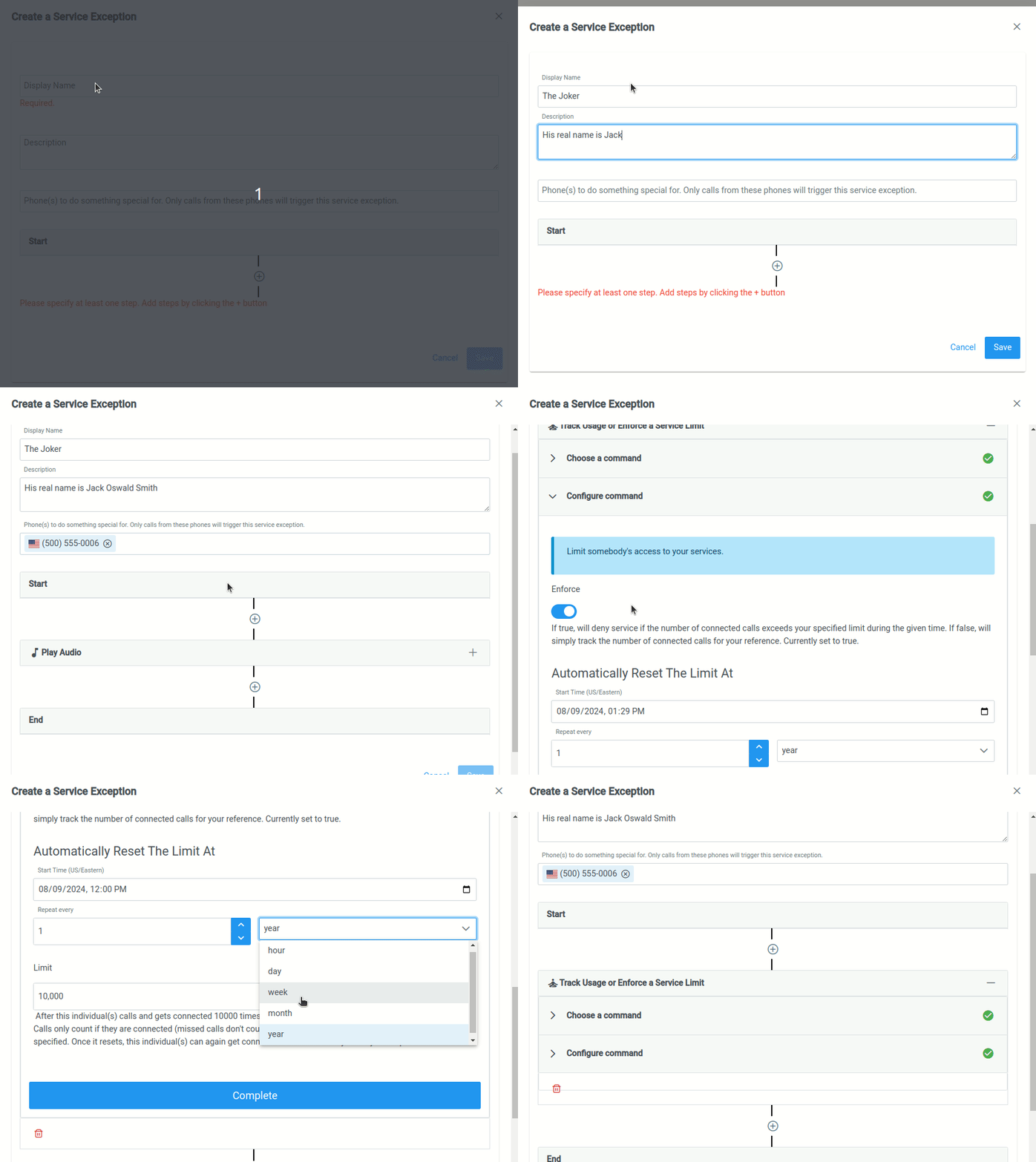
With Helpline Software, you can set limits per caller: a specific number of calls per hour, day, week, or year. Want to track a caller's patterns before enforcing anything? Put the limit in "Track" mode. Only connected calls count. When you're ready to enforce, switch it on. The caller hears a custom message, and your staff never has to engage.
Automation That Reduces Admin Burden
Repetitive tasks are a leading cause of burnout. Updating schedules in multiple systems. Manually forwarding calls when shifts change. Sending the same reminder texts by hand. These tasks add up, and they feel worse every time because everyone knows they should be automated.
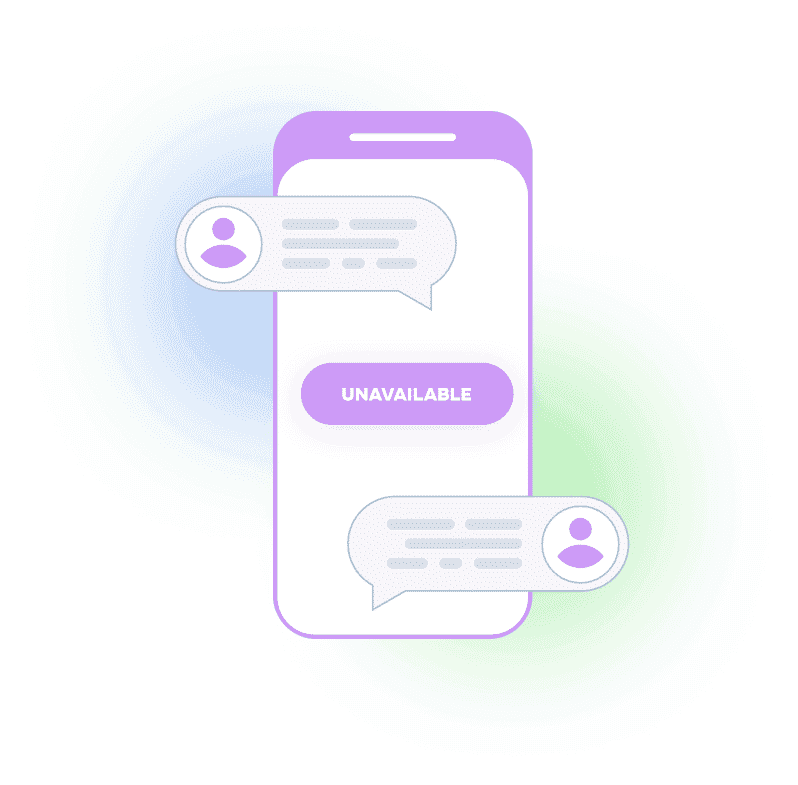
Helpline Software handles schedule changes, call routing, shift reminders, and callback coordination automatically. When a volunteer marks themselves unavailable, calls skip them without anyone logging in to make it happen. When a shift starts, routing updates instantly. The goal is to eliminate the categories of work that drain energy without serving callers.
One System Instead of Three
Most agencies juggle separate tools for scheduling, call routing, and reporting. Every schedule change requires updating multiple places. Every missed update means calls going to the wrong person or nobody at all. The person responsible for keeping everything in sync is usually you, and that responsibility never sleeps.
With Helpline Software, the schedule controls the routing. Change the schedule once, and call routing follows. Add someone to a shift, and they start receiving calls when that shift begins. No second system to update. No midnight logins. The integration itself reduces the administrative burden that contributes to coordinator burnout.

Trusted for critical calls by crisis hotlines.
Answer more inbound calls without adding headcount. Helpline Software brings call handling, scheduling, and follow-up workflows into one integrated platform, so your team can respond faster and spend less time on admin.

Helpline Software is a great tool for our dual domestic violence/sexual assault service agency. It has allowed our clients another outlet (and a convenient one) to reach us when they need us most. The program is user-friendly and powerful enough to make a positive impact on the services we provide. The best part is the quick support and personal response you receive when you have any questions or need help personalizing the software to your agencies’ needs.

Concierge Onboarding
Expect white-glove, done-for-you onboarding. You bring your requirements and preferences. We will help you translate them into a configuration that fits your team.
We have supported hotlines, helplines, and crisis lines long enough to know what tends to break under pressure. We will share patterns we have seen work well, flag common pitfalls, and design a custom setup aligned to your requirements. That includes schedules, workflows, routing rules, and integrations, so your system is ready for day one.
Disclaimer: We are a software provider. We can share general information based on prior experience, but you know your needs best. You are fully responsible for your hotline’s configuration and for ensuring your requirements are met. Our role is limited to information sharing.

Packages & Pricing
Pricing is structured around system access, configuration, and support rather than individual telecom components. All communication capabilities, voice, messaging, scheduling, workflows, and reporting, are bundled into unified plans designed to scale with your organization’s needs.
For current packages and what is included in each plan, review our pricing.

150% Money Back Guarantee
Try Helpline Software risk-free! If you're not satisfied within 30 days, we'll refund all your money. Plus give you up to $500.
Frequently Asked Questions About Burnout Protection
›How does the burnout prediction algorithm work?
›Can we customize the chronic caller limits?
›What happens when a chronic caller exceeds their limit?
›Does this replace the need for clinical supervision?
›How quickly can we see results?
›Can staff see their own burnout risk?

Want a clearer view of burnout drivers?
If burnout is showing up as turnover, coverage gaps, or chronic overload, the most useful first step is getting visibility into what is actually happening on shifts and calls.
Book a short call to review your current workflow and identify a practical next step.