


REQUEST FOLLOW-UP

Your Hotline Needs More Than a Standard Answering Service
Most standard answering service assumes the same person answers every time. Hotlines don't work that way. Volunteers rotate, schedules change, and staff may answer from their personal cell phones. When that chain breaks, the call doesn't reach a backup. It just disappears.
Helpline Software is built for crisis lines, nonprofit helplines, and support teams. It unifies routing, scheduling, callbacks, and reporting, so no call gets lost between shifts and every caller reaches the right person.
Not sure how to set up your hotline end-to-end? Our guide on how to start a hotline walks through coverage models, routing fallbacks, and the setup decisions that determine whether your line holds up under real conditions.
Where covered lines still lose calls
A hotline that looks fully staffed on paper can still break down. Shifts are filled, the number is published, and the automated greeting answers, yet when a call comes in, the volunteer’s phone doesn’t ring because they’re on another call, out of reception, or the forwarding rule never updated. There’s no log, no callback, no trace, just a caller who didn’t get through.
That's a system problem. The routing didn't handle the gap, the schedule wasn't connected to the routing, and nobody knew until someone probably complained.
Agencies using Helpline Software have supported up to 84% more callers without adding headcount, based on data across customer deployments. The gain is closing the places where calls fall through unnoticed.
4 Things Helpline Software Fixes Right Away
Calls go to whoever is on shift: primary, backup, then escalation, without manual updates or missed coverage
If no one answers, callers can leave a safe callback number. The system automatically connects the first available on-call person.
Every routing attempt is recorded: who was tried, who was busy, and why, without relying on anyone's recollection.
Routing, scheduling, callbacks, and reporting work together. No copying the schedule into a second platform, or stitching tools together.
What Our Customers Say
Our customers love how customizable the system is, the top-notch support, and how easy it is to use Helpline Software.
"…customer service is responsive, honest, articulate… it's top-notch…"

"There's definitely an awareness with the customer service team that every agency is different… It's very 'meet us where we're at.'"
"I'm loving this system. It's incredibly easy to tailor, and it does exactly what [our on-call personnel] need. Instead of troubleshooting, [our on-call personnel] are spending that time with [callers]."
"It really has changed a huge part of our organization."

"Having a system customized to fit [our needs] has been invaluable. HelplineSoftware gives us the tools we need to support both our staff and [callers]."

"Helpline Software has been an incredible thought partner. They offer creative solutions and really care about the mission of the agencies they serve."

"We are incredibly grateful for our wonderful transition to Helpline this year. The entire process has been seamless, and our team has had nothing but glowing feedback. The ease of use, combined with your excellent customer service, has made a world of difference."

"…take a leap of faith and do it… it is a game changer… it will alleviate a lot of misused time and… [you] will thank me later."


Not All Callers Are the Same
Routing should match the caller, not just the system. Pick your program type below, and if yours isn't listed, read the last tab.
Your survivor line and your SANE nurse line are two completely different operations. Your current system probably doesn't know that.
When law enforcement calls for an accompaniment, that call should never land on a volunteer on-call staff member. When a survivor reaches your number, pressing a digit may not be something they can do safely. You need two call trees, two schedules, two escalation paths, and a system that holds all of it without a developer in the room.
Helpline Software runs a nurse schedule and a volunteer on-call tree in parallel, inside the same platform. Callers get routed correctly from the first ring. Your coordinator doesn't have to babysit it.
How Helpline Software works
Everything connects. When your schedule changes, routing updates. When no one answers, callbacks fire. When a callback goes unresolved, escalation kicks in. Reporting covers the whole chain.
| Feature | What you get |
|---|---|
| Routing & forwarding | Calls reach the right person automatically: primary, backup, then escalation, with no manual updates needed when the schedule changes. |
| Shift scheduling | One platform manages shifts and routing together. Change a schedule, and the routing follows. |
| Callback handling | No answer doesn't mean call is lost. Callers leave a safe number, the system monitors availability, and connects them the moment someone accepts. |
| Escalation logic | If a callback sits too long, a supervisor gets notified. Not a dashboard alert, but an actual wake-up. |
| Secure data | Every call log, contact detail, and interaction record is stored with access controls. Built for teams handling sensitive information. |
| Reporting | Volume, hold times, missed calls, callback performance, all exportable. Ready for funders, compliance reviews, and your own planning. |
| Webchat & text | Callers who prefer to type get the same coverage as voice. Same on-call logic, no separate process for your team to manage. |
| Burnout protection | Call limits, scheduled breaks, and workload visibility help coordinators rebalance before anyone carries too much. |

Less manual work for your coordinator
Most hotlines aren't run by large, staffed contact centers. They're run by small teams: a coordinator, rotating volunteers, maybe a part-time specialist. People answer on personal phones while doing other things. When the system requires constant manual upkeep to stay accurate, the coordinator becomes the connection between every part, and that's not a sustainable position.
Helpline Software is built to take that load off. Volunteers see their shifts. Schedule changes carry through to routing without a second manual step. When someone marks themselves unavailable, the system routes around them and records why. The coordinator can step back from constant monitoring without the line going quiet.
What's left is the work that matters: supporting callers, developing staff, running the program.

24/7 coverage that actually works
Crises don’t follow a schedule. Any 24/7 line can exist on paper, but can it deliver at 2 a.m. on a Sunday when staffing is thin?
Voicemail, unprepared transfers, or a line that rings six times and drops aren’t backups.
Helpline Software handles every call with a live routing chain: the primary answers first, backup takes over if needed, and escalation fires automatically. Every step is logged, so leadership always knows what happened, whether for operations, compliance, or funder reporting.

It’s been incredibly helpful for tracking volunteer engagement without requiring extra manual follow-up. It also opens up conversations about maintaining healthy boundaries on calls, which is crucial for volunteer sustainability and well-being.
Keep Your Line Running with Helpline Software
Route by time of day, call type, or on-call schedule. No manual updates between shifts.
Manage volunteer and staff schedules inside the same platform that drives your routing.
Keep the number your community already knows. Add routing on top without changing what callers dial.
Call logs and caller details stored with access controls. Built for sensitive information.
Reach callers where they are. On-call person numbers stay protected.
Workload controls and call limits that help coordinators protect their team before problems start.

Automated Call Routing & Forwarding
When a call comes in, the platform routes it to whoever is scheduled, primary first, then backup, without requiring anyone to update anything. If the primary is already on a call or marked unavailable, the system skips them, records the reason, and moves to the next person. No silent failures.
Call routing built for crisis lines handles the situations that generic forwarding misses: first-ring failures on cell phones, busy states, and reception gaps. The log covers every step.

Shift Scheduling
Scheduling lives inside the same system as routing. When a volunteer signs up, swaps a shift, or marks themselves unavailable, routing updates automatically. No separate spreadsheet, or manual coordination. Coordinators can make bulk edits in minutes, and volunteers see their upcoming shifts without logging into a separate tool.
Shift schedule management connected to routing eliminates an entire category of missed calls: the ones caused by empty schedules, not by anything the on-call person did or didn't do.

Works With Your Existing Number
You don't need to change the number your community already knows. Forward your existing number to Helpline Software, and the platform applies your routing rules from there. Most organizations are live within a few business days. The setup process is straightforward: you configure rules and schedules, not hardware.
Don't have an number already? No problem. We can provide you with a new hotline number of your choice, hosted on our outage protection infrastructure.
Secure Data Management
Call logs, contact details, and interaction records are stored with access controls. Authorized staff see what they need. Nobody else does. The secure database is designed for organizations handling sensitive caller information, including crisis lines, survivor advocacy programs, and any line where confidentiality is a core requirement.
This applies to reporting too. You can export logs for funder requirements and grant documentation without surfacing information that shouldn't be shared externally.

Webchat, Text & Confidential Callbacks
In some cases, people prefer to contact your line via webchat or text instead of calling. Helpline Software provides a fully integrated Live chat and text support system for organizations that can't miss a chat, text, or call.
Confidential callbacks let on-call staff return calls instantly while protecting their personal numbers; the caller sees a secure number. For programs working with survivors, people in difficult situations, or anyone where caller safety is a real concern, that matters from the very first contact.
Multilingual routing is configurable, including separate callback and staffing paths for different language needs, not just translated recordings.
Burnout Protection
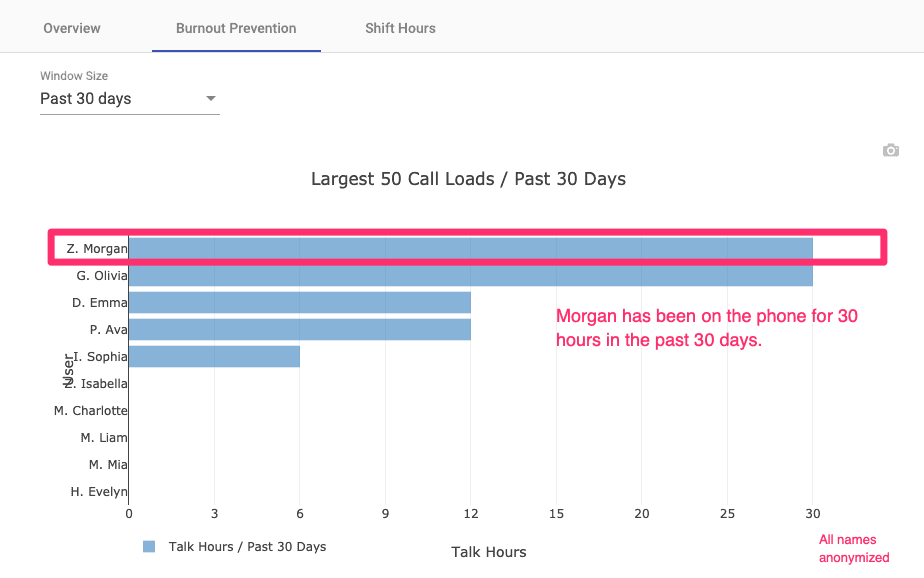
Taking difficult calls repeatedly takes a toll. Limits on consecutive calls, breaks between interactions, and visible workload distribution give coordinators the tools to rebalance before anyone hits a wall. The platform supports sustainable coverage rather than leaving it to informal coordination.
When staff stay longer, they bring more experience to every call. That's good for callers, and it's good for the organization running the line.
Review your setup with an expert
Hotline workflows tend to break in predictable places: schedule changes that don't carry through, cell phones that don't ring on the first attempt, backup logic that only covers one layer. Reliability comes from routing, schedules, callbacks, and escalation working together in one platform.
Talk to an expert. We'll look at your current setup and identify where calls are most likely falling through.
Customer Success Stories
- See how teams reduced operational pressure in the LCSNW case study.
- Read the Verity case study for a view of what changed operationally.
- Watch short clips in customer testimonials.

Concierge Onboarding
Expect white-glove, done-for-you onboarding. You bring your requirements and preferences. We will help you translate them into a configuration that fits your team.
We have supported hotlines, helplines, and crisis lines long enough to know what tends to break under pressure. We will share patterns we have seen work well, flag common pitfalls, and design a custom setup aligned to your requirements. That includes schedules, workflows, routing rules, and integrations, so your system is ready for day one.
Disclaimer: We are a software provider. We can share general information based on prior experience, but you know your needs best. You are fully responsible for your hotline’s configuration and for ensuring your requirements are met. Our role is limited to information sharing.

Packages & Pricing
Pricing is structured around system access, configuration, and support rather than individual telecom components. All communication capabilities, voice, messaging, scheduling, workflows, and reporting, are bundled into unified plans designed to scale with your organization’s needs.
For current packages and what is included in each plan, review our pricing.

150% Money Back Guarantee
Try Helpline Software risk-free! If you're not satisfied within 30 days, we'll refund all your money. Plus give you up to $500.
Frequently Asked Questions
›Can we keep our existing hotline number?
›How much does a hotline answering service typically cost?
›How quickly can we get set up?
›Does Helpline Software use third-party operators to answer calls?
›What happens when the first person doesn't answer?
›Can we route different call types differently?
›Can we reduce wrong-number contacts that reach our on-call team?
›What data is retained, and can we limit it for confidentiality?
›Do callers have to leave a voicemail if nobody is available?
›Can the platform support multiple languages?